
Traffic Warrants in Palo Pinto County
A missed appearance or unpaid citation can cause a court to take additional action, but the process is controlled by the court that issued the ticket. Palo Pinto County includes municipal and justice courts; there is no single public county traffic-warrant search that covers every city and precinct. The date, citation number, and court name on the original notice are the best starting points.
Do not assume a payment portal is also a warrant database. Local justice courts provide payment links, while Mineral Wells has a city citation and warrant-status portal. Those are different functions. A court clerk can tell a person whether a citation has progressed to a warrant and what response the court will accept.
Match a Palo Pinto County Traffic Citation to Its Court
First identify whether the ticket came from Mineral Wells Municipal Court, another municipal court, or a Palo Pinto County justice court. A ticket issued inside a city may be processed by that city; a county citation may be filed with a JP precinct. The County's JP payment hub lists five precincts, but a payment menu is not proof that a warrant search is offered there.
Historic roundup notices are not a current countywide warrant list. A 2015 Mineral Wells roundup document records a past city initiative and does not establish today's open cases, active status, or an amnesty period. Ask the issuing court to match the cause or citation number to its current file.
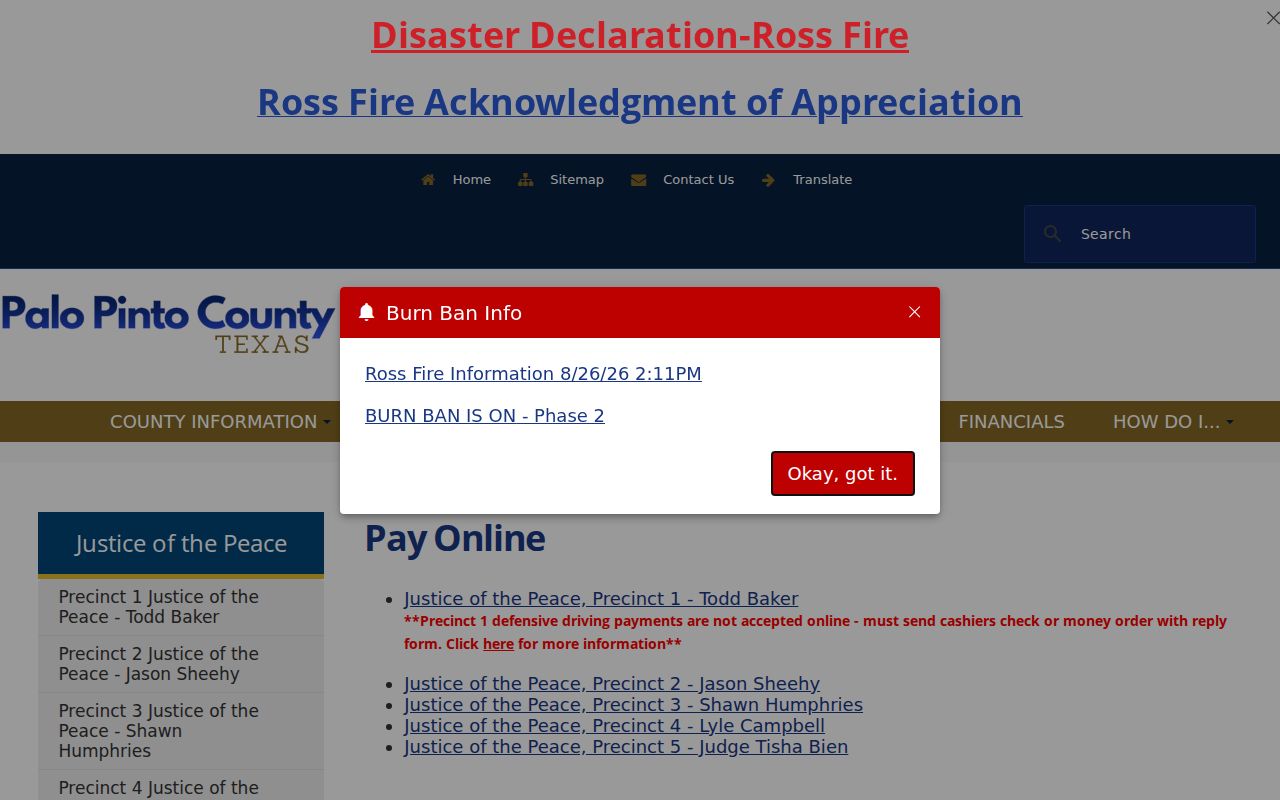
The Palo Pinto County justice court payment page routes payments by precinct. Use the court named on the ticket before selecting a payment route.
How to Check for a Palo Pinto County Traffic Warrant
Use the issuing court's own lookup where the research confirms one, then contact the clerk if the result is missing or unclear. Mineral Wells asks for identifying citation information through its city portal; other courts may require the citation or cause number.
- Read the ticket or notice and identify the issuing municipal court or JP precinct.
- For a Mineral Wells citation, use its city portal with the requested date of birth and citation, driver's-license, or name information. The portal directs users to the clerk about an issued warrant.
- Call the court using the phone number on the citation or its official contact page and ask for current status, balance, and next appearance requirements.
- If online details do not resolve the question, contact the clerk in person or by the court's listed process; bring the citation or cause number and ask whether the order has been recalled.
Mineral Wells Traffic Warrant Lookup Leads to the Clerk
The Mineral Wells Municipal Court portal accepts several ways to locate a citation, including date of birth with citation or driver's-license details and a name search. Its own instructions tell a person to contact the clerk when a warrant has issued. That distinction matters: a citation lookup can help find the case, while a clerk confirms the court's current status and available resolution path.
The city also publishes a warrant-status report with warrant, document, and financial fields. It is a municipal-court report, not a county sheriff roster, not a complete list for other courts, and not an authority for law enforcement action. Check its date and verify the result directly with the court.
Use the Mineral Wells warrant-status report only to locate a possible city record. The report itself directs readers to the Municipal Court for current handling.
What a Traffic Warrant Shows
There is no uniform public field set across every Palo Pinto County court. The Mineral Wells report displays reference numbers and financial details, while another court may provide only a case status or require a clerk inquiry. Treat each field as a lead to the court file and confirm what remains due before sending money.
| Warrant Number | Warrant# is a reference field in the Mineral Wells city report; other courts may use a different identifier. |
|---|---|
| Citation or Cause | Use the original ticket or court case number to match the correct record. |
| Document References | Mineral Wells displays document and warrant-document fields for its municipal report. |
| Fine and Costs | The report may show amounts; ask the clerk for the current total and accepted options. |
| Bond | A listed bond field should be confirmed with the issuing court before action. |
| Current Status | Verify whether a warrant remains open or has been recalled; a stale report can lag. |
JP Traffic Warrant Payment Links Do Not Confirm Status
The County's JP payment page routes Precinct 1 through Go2Gov and Precincts 2 through 5 through GovRec. The page is a payment directory, not a searchable county warrant index. Before paying, confirm the court, cause, and balance with the clerk. A payment applied to the wrong court or citation may not resolve the matter shown on another record.
Keep the receipt and ask what action the court will take after payment. Where an appearance is required or a person disputes the charge, paying online may not substitute for a court date. The sources do not promise automatic same-day warrant recall or a uniform update interval across all five precincts.
The County's JP payment hub shows the available precinct routes. Use it only after matching the ticket to the right court.
For a warrant status question, contact the named JP clerk rather than relying on the payment page alone.
Past Mineral Wells Roundups Do Not Set Current Traffic Status
Mineral Wells' 2014 and 2015 roundup notices describe historical municipal-court efforts. They are not a current Palo Pinto County traffic-warrant list, and the official source review found no current 2024 through 2026 amnesty or fee-waiver event. A dated notice cannot establish whether a particular citation is still open.
Use the issuing court's current record for a traffic case. The 2015 Mineral Wells roundup PDF is a historical city source, not present-day clearance guidance.
Paying or Lifting a Traffic Warrant
The issuer determines whether a person may pay, appear, request a payment arrangement, or contest the citation. Confirm the current balance and whether an appearance is required before using an online payment link. If the case is disputed, ask the clerk about the court's process and consider getting legal advice.
- Confirm the citation, court, balance, and warrant status with the issuing clerk.
- Ask whether payment, a scheduled appearance, or another court-approved step is required.
- Use the official court route for payment or appearance and retain proof of what was submitted.
- Follow up with the clerk to confirm the court's record shows the required action and whether any separate state hold remains.
Warning: Do not assume a payment receipt alone recalls a warrant; only the issuing court can confirm its status and any separate license-related action.
Palo Pinto County Traffic Warrants and DPS Compliance Are Separate
Texas DPS's Failure to Appear or Failure to Pay program concerns driver-license compliance and reporting from a court. It is not a warrant search and does not decide whether a local judge has recalled a warrant. The DPS page describes a processing estimate of three to five business days after compliance, while its FAQ says processing may take up to seven days. Because those statements differ, verify a particular case with both the court and DPS rather than promising a fixed clearance time.
A court may still need to update its own case after a payment or appearance. Ask which office sent the state report and what confirmation it can provide. Do not treat a cleared state hold as proof that every court obligation is complete.
See the Texas DPS FTA/FTP program information for the statewide compliance process.
Traffic Warrant vs FTA and License Holds
A single citation can create more than one issue, but the terms describe distinct records and consequences. A warrant concerns the court's authority to direct an arrest. A failure-to-appear status can trigger court action. A DPS compliance hold concerns license eligibility after court reporting. Check each source separately and ask the issuing court what remains open.
| Record or action | What it concerns | Where to confirm |
|---|---|---|
| Traffic warrant | A court order related to a citation or missed obligation. | The issuing municipal or justice court. |
| Failure to appear | A missed court requirement and the court's response. | The court handling the citation. |
| License compliance hold | State driver-license compliance after court reporting. | The court and Texas DPS. |