
Municipal Court Warrants in Palo Pinto County
A municipal court handles matters within its city's authority, including local ordinance and qualifying fine-only cases. A missed appearance or unpaid court obligation can lead to a warrant or other enforcement action. The issuing city court maintains its own case status; the County Sheriff's booking link and justice court payment page do not substitute for that city's record.
This distinction matters across the county. The research located a Mineral Wells municipal warrant-status report, but not a single countywide municipal warrant index. A search result from one city cannot establish status in another city's court or a JP precinct. Use the court name and citation printed on the notice to route the inquiry.
Mineral Wells Publishes a City Court Warrant Report
Mineral Wells is the only local city for which the research found a public warrant-status report. The city report identifies municipal cases and includes warrant, document, and financial reference fields. It is not a county sheriff list, does not cover justice court warrants, and should not be treated as an arrest authorization or a complete current docket.
The city also has a citation portal that accepts identifying information such as date of birth with citation or driver's-license details, or a name search. Its instructions direct users to the Municipal Court clerk when a warrant has issued. A name match is a lead; the clerk must confirm current balance, status, and any required appearance.
Check the Mineral Wells municipal warrant-status report and then contact the issuing court for the current case record.
Mineral Wells Sends Issued-Warrant Questions to Its Clerk
The city's citation account can locate a case using date of birth with a citation number, driver's-license number, or name. Its instructions direct a person to contact the Municipal Court clerk when a warrant has issued. The online account helps find a citation; the clerk confirms warrant status and explains the next court step.
See the Mineral Wells online payments page for the city account instructions. A standard citation search is not a warrant clearance.
Which Palo Pinto County Cities Have Municipal Courts
Local sources confirm different levels of public access. A city calendar or contact page is not the same as a warrant list. The table separates a located court source from a public warrant-search result so a reader can see where direct clerk confirmation remains necessary.
| City | Court or source located | What the source establishes |
|---|---|---|
| Mineral Wells | Municipal Court portal and warrant-status report | Citation lookup and city warrant references; clerk confirms issued-warrant status. |
| Strawn | City court calendar | Calendar information is available; no public warrant roster was located. |
| Graford | No public city warrant report located | Use the court named on the citation and request confirmation from its clerk. |
| Gordon and Mingus | No public city warrant report located | Verify the issuing court from the citation; do not infer status from a county list. |
Strawn's Calendar Is Not a Warrant Roster
The Strawn material located in the research is a court calendar, not a list of people with active warrants. A calendar can help a reader identify a public setting or court contact, but it does not prove that a particular citation is open or that a warrant has issued. Do not use a calendar entry as a substitute for the clerk's case status.
For Strawn matters, use the city court calendar and contact route attached to the citation and ask which court has the cause. If the notice was issued by a county JP rather than the city, the JP precinct controls it. That distinction helps avoid paying the wrong court or assuming an online date resolves an older case.
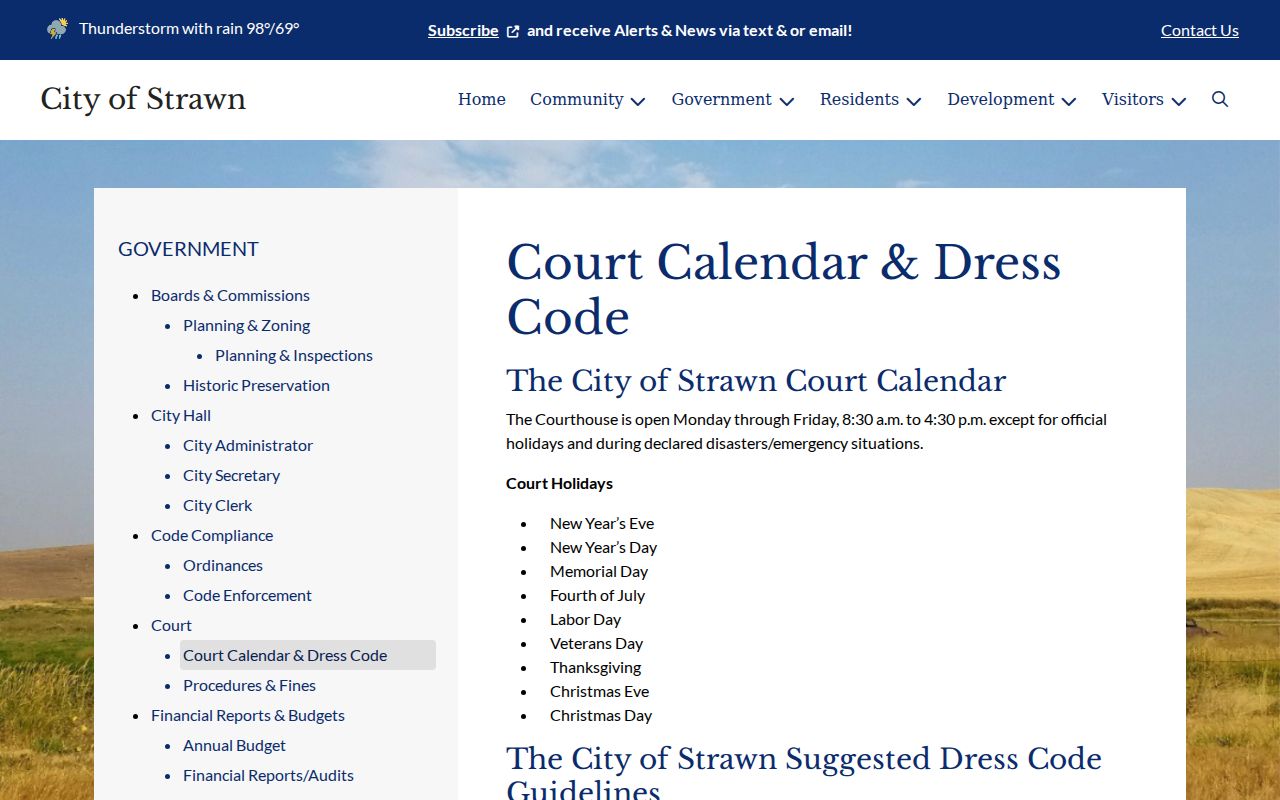
The calendar is a contact and setting resource; its entries are not a searchable warrant list.
How to Check a Municipal Court Warrant
Start with the city's own citation or court source when one exists. Mineral Wells supports a citation lookup, but directs warrant questions to its clerk. The research did not identify a common search portal, city police warrant desk, or published warrant list covering every Palo Pinto city.
- Read the ticket or notice to identify the city, court, citation number, and any appearance date.
- For Mineral Wells, use the city citation portal with the identifiers it requests; a result does not replace clerk confirmation.
- Call or visit the clerk for the court named on the document and ask whether a warrant is active, what amount is due, and whether an appearance is required.
- If the city source does not match the notice, ask whether the case belongs to a JP court or another court before paying or missing another date.
City Warrants and County Court Warrants Stay Separate
A municipal case does not become a County Clerk criminal case simply because the city sits in Palo Pinto County. Justice courts have their own precinct dockets and payment links; city courts hold municipal matters. The county sheriff's Interop link concerns inmate and booking information, not a complete warrant roster for each municipality.
Texas's current municipal procedure is governed by state law, including the municipal-court provisions in Chapter 45A of the Code of Criminal Procedure. A reader should ask the court that controls the ticket about service, appearance, and payment options. The courthouse level matters more than a countywide search phrase.
The Texas Code of Criminal Procedure, Chapter 45A provides the current statutory framework for municipal court proceedings.
What a Municipal Court Warrant Shows
The Mineral Wells public report offers a useful example of city record fields, but other city courts may not publish the same information. It includes reference numbers, fine and cost figures, and a bond field. Those values help identify a case; they do not guarantee the report has the latest court action.
| Warrant Number | The city's reference for the warrant record. |
|---|---|
| Document Number | A file reference used to connect the report entry with the court's papers. |
| Warrant Document | A further city report reference; ask the clerk how it maps to the cause. |
| Fine and Costs | The amount shown in the report may need confirmation for current balance. |
| Bond | A displayed bond figure is not legal advice or a guaranteed release amount. |
County JP Payment Links Do Not Pay a City Warrant
The County's justice-court hub routes payments by precinct. It is not a Mineral Wells or Strawn municipal payment portal, and a payment there cannot be assumed to change a city docket. Match the city and court printed on the citation before using a payment link.
For county JP cases, contact the named precinct about balances and warrant status. For a municipal citation, contact that city's court. The Palo Pinto County JP payment hub is a payment route only, not a shared active-warrant search.
Resolving a Municipal Court Warrant
The issuing municipal court controls the steps for its warrant. Ask whether the case can be handled by payment, a scheduled appearance, or another court-approved procedure. A court may require a person to appear even when an online portal permits citation lookup or payment. The local sources do not promise a standard amnesty window or same-day recall.
- Confirm the active case and current status with the issuing city's clerk.
- Ask what the court requires to resolve the warrant and underlying citation.
- Use only the payment or appearance method the clerk confirms for that case.
- Follow up to verify the court's record reflects the action and whether another agency update is needed.
Warning: A portal lookup or payment receipt does not by itself prove the court recalled a warrant; confirm status with the issuing clerk.